Modulation Transfer Function
The Modulation Transfer Function (MTF) is a standard way of describing how well an imaging system preserves detail and contrast. It measures the ratio of image contrast to object contrast at different levels of detail, expressed in terms of spatial frequency.
In simpler terms, MTF shows how clearly an imaging system can reproduce fine patterns: large features are usually transferred well, while very small details tend to blur and lose contrast.
Peak-Valley MTF
The Peak-Valley MTF is used in CBCT and planar imaging metrics to describe high-contrast characteristics of the imaging system. An excellent introduction is here. In pylinac, Peak-Valley MTF is calculated using equation 3 of the above reference, which is also the Michelson contrast definition.
Then, all the contrasts are normalized to the largest one, resulting in a normalized MTF or rMTF (relative). Pylinac only reports rMTF values. This is the first of two inputs. The other is the line pair spacing. The spacing is usually provided by the phantom manufacturer. The rMTF is the plotted against the line pair/mm values. Also from this data the MTF at a certain percentage (e.g. 50%) can be determined in units of lp/mm.
However, it’s important to know what \(I_{max}\) and \(I_{min}\) means here. For a line pair set, each bar and space-between is one contrast value. Thus, one contrast value is calculated for each bar/space combo. For phantoms with areas of the same spacing (e.g. the Leeds), all bars and spaces are the same and thus we can use an area-based ROI for the input to the contrast equation.
ESF-based MTF
Logic
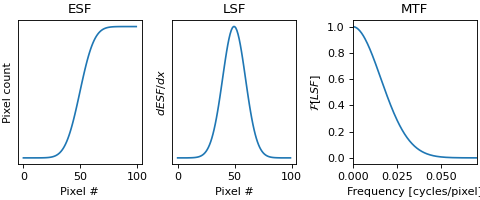
The Modulation Transfer Function (MTF) can be determined from an edge spread function (ESF) by first calculating the line spread function (LSF) from the ESF, then taking the Fourier transform of the LSF. The magnitude of the resulting complex function is the MTF.
(Source code, png, hires.png, pdf)
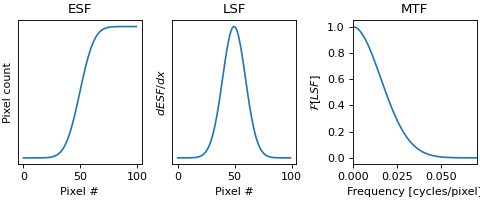
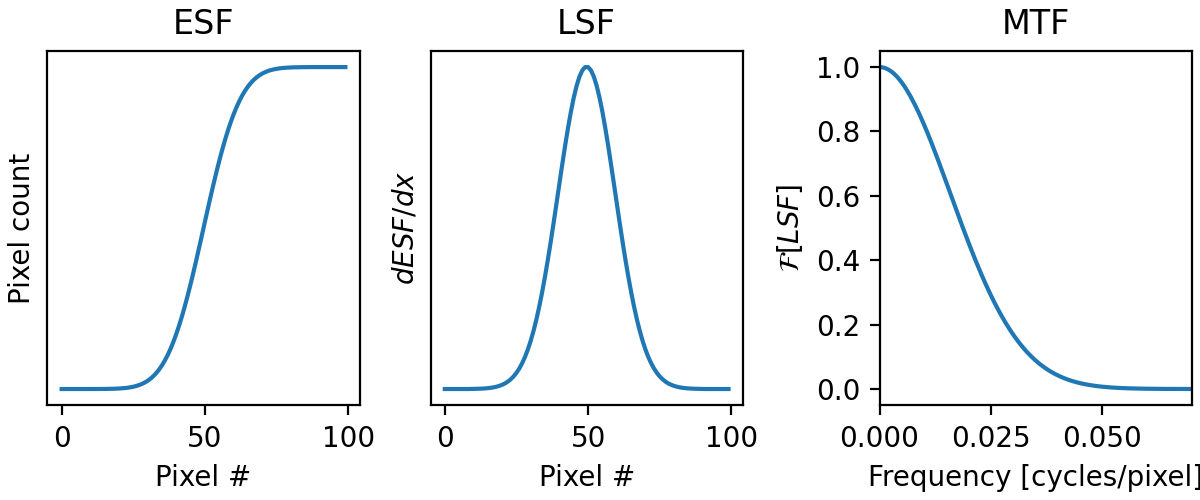
Implementation
In pylinac, the MTF is computed from a list of profiles (edge spread functions) for example, multiple profiles taken at different edge positions of a phantom. The profiles can have different lengths (by default they are padded to a common size). Since it is not guaranteed that all profiles are aligned, the MTF is calculated for each profile individually, and then the results are averaged to obtain a single MTF.
It is assumed that the sample spacing (input parameter in mm) is the same for all profiles.
If
sample_spacingis None (default) the frequency axis is expressed in cycles per sample, up to 0.5 (Nyquist frequency).If
sample_spacingis provided, the frequency axis is expressed in line pairs per mm, up to the Nyquist limit determined by the sample spacing.
# Default: frequency axis is expressd in cycles/sample
EdgeSpreadFunctionMTF(...)
# Same as above
EdgeSpreadFunctionMTF(..., sample_spacing = None)
# Sample_spacing in mm: frequency axis is expressd in line pairs/mm
EdgeSpreadFunctionMTF(..., sample_spacing = 0.5)
Each profile MTF is computed using the following sequence of operations:
Differentiate ESF → LSF
Compute the line spread function (LSF) as the discrete derivative of the ESF, implemented with a central-difference method (
lsf = np.gradient(esf)).Apply windowing
Multiply the LSF by a windowing function to taper the edges and reduce spectral leakage introduced by the finite measurement length. The default window is
scipy.signal.windows.hann. This can be modified using thewindowingparameter. Input arguments to the windowing function can also be passed in the constructor throughkwargs.(see more windowing functions here: https://docs.scipy.org/doc/scipy/reference/signal.windows.html)
# Default window: Hann
EdgeSpreadFunctionMTF(...)
# No windowing
EdgeSpreadFunctionMTF(..., windowing=None)
# Custom window with default parameters
EdgeSpreadFunctionMTF(..., windowing=scipy.signal.windows.tukey)
# Custom window with custom parameters
EdgeSpreadFunctionMTF(..., windowing=scipy.signal.windows.tukey, alpha=0.3)
Zero-pad for frequency resolution
Pad the LSF to the target length (default:
1024samples). Padding does not add information, but interpolates the frequency spectrum more finely, improving the resolution of the displayed MTF curve. This can be modified using the parameterspadding_modeandnum_samples:# no padding EdgeSpreadFunctionMTF(..., padding_mode="none") # array zero-padded to 2048 elements (must be larger than the largest array) EdgeSpreadFunctionMTF(..., padding_mode="fixed", num_samples=2048) # array padded to the next power of 2 or num_samples (i.e. len(largest_array) == 200 => num_samples=1024, len(largest_array) == 1025 => num_samples=2048) EdgeSpreadFunctionMTF(..., padding_mode="auto", num_samples=1024)
Fourier transform
Compute the fast Fourier transform (FFT) of the windowed and padded LSF.
Magnitude spectrum → MTF
Take the modulus (magnitude) of the FFT result to obtain the (unnormalized) MTF.
Normalization
Normalize the MTF by dividing by the first value so that
MTF(0) = 1.
Moments-based MTF
The MTF can also be calculated using the moments of the line pair spread function (LPSF). This algorithm is based on the work of Hander et al [1]. Specifically, equation 8:
where \(\mu\) is the mean pixel value of the ROI and \(\sigma\) is the standard deviation of the ROI pixel values.
API Documentation
- class pylinac.core.mtf.MTF(lp_spacings: Sequence[float], lp_maximums: Sequence[float], lp_minimums: Sequence[float])[source]
Bases:
objectThis class will calculate relative MTF
Parameters
- lp_spacingssequence of floats
These are the physical spacings per unit distance. E.g. 0.1 line pairs/mm.
- lp_maximumssequence of floats
These are the maximum values of the sample ROIs.
- lp_minimumssequence of floats
These are the minimum values of the sample ROIs.
- relative_resolution(x: float = 50) float[source]
Return the line pair value at the given rMTF resolution value.
Parameters
- xfloat
The percentage of the rMTF to determine the line pair value. Must be between 0 and 100.
- classmethod from_high_contrast_diskset(spacings: Sequence[float], diskset: Sequence[HighContrastDiskROI | RectangleROI]) MTF[source]
Construct the MTF using high contrast disks from the ROI module.
- plotly(fig: Figure | None = None, x_label: str = 'Line pairs / mm', y_label: str = 'Relative MTF', title: str = 'Relative MTF', name: str = 'rMTF', **kwargs) Figure[source]
Plot the Relative MTF.
Parameters
- plot(axis: Axes | None = None, grid: bool = True, x_label: str = 'Line pairs / mm', y_label: str = 'Relative MTF', title: str = 'RMTF', margins: float = 0.05, marker: str = 'o', label: str = 'rMTF') list[Line2D][source]
Plot the Relative MTF.
Parameters
- axisNone, matplotlib.Axes
The axis to plot the MTF on. If None, will create a new figure.
- class pylinac.core.mtf.PeakValleyMTF(lp_spacings: Sequence[float], lp_maximums: Sequence[float], lp_minimums: Sequence[float])[source]
Bases:
MTFParameters
- lp_spacingssequence of floats
These are the physical spacings per unit distance. E.g. 0.1 line pairs/mm.
- lp_maximumssequence of floats
These are the maximum values of the sample ROIs.
- lp_minimumssequence of floats
These are the minimum values of the sample ROIs.
- pylinac.core.mtf.moments_mtf(mean: float, std: float) float[source]
The moments-based MTF based on Hander et al 1997 Equation 8.
See Also
https://aapm.onlinelibrary.wiley.com/doi/epdf/10.1118/1.597928
- pylinac.core.mtf.moments_fwhm(width: float, mean: float, std: float) float[source]
The moments-based FWHM based on Hander et al 1997 Equation A8.
Parameters
- widthfloat
The bar width in mm
- meanfloat
The mean of the ROI.
- stdfloat
The standard deviation of the ROI.
See Also
https://aapm.onlinelibrary.wiley.com/doi/epdf/10.1118/1.597928
- class pylinac.core.mtf.MomentMTF(lpmms: Sequence[float], means: Sequence[float], stds: Sequence[float])[source]
Bases:
objectA moments-based MTF. Based on the work of Hander et al 1997.
Parameters
- lpmmssequence of floats
The line pairs per mm.
- meanssequence of floats
The means of the ROIs.
- stdssequence of floats
The standard deviations of the ROIs.
See Also
https://aapm.onlinelibrary.wiley.com/doi/epdf/10.1118/1.597928
- classmethod from_high_contrast_diskset(lpmms: Sequence[float], diskset: Sequence[HighContrastDiskROI]) MomentMTF[source]
Construct the MTF using high contrast disks from the ROI module.
- class pylinac.core.mtf.EdgeSpreadFunctionMTF(esf: list[~numpy.ndarray], sample_spacing: float | None = None, padding_mode: ~typing.Literal['none', 'fixed', 'auto'] = 'auto', num_samples: int = 1024, windowing: ~collections.abc.Callable | None = <function hann>, **kwargs: ~typing.Any)[source]
Bases:
objectThis class will calculate relative MTF from multiple edge spread function (ESF) The MTF is calculated for each ESF and the output is the average of all.
Parameters
- esflist[ndarray]
These are the edge spread functions (ESF). Each element of the list represents an ESF.
- sample_spacingfloat | None
This is the sample spacing in mm. If None, the frequency axis is cycles/pixel, otherwise it’s converted to lp/mm. Default is None.
- padding_modeLiteral[“none”, “fixed”, “auto”]
This is the padding mode (adding zeros) to increase resolution. Default is “auto”
mode=”none”: array is unchanged
mode=”fixed”: pad to
num_samples(must be larger than the largest array)mode=”auto”: pad to the next power of two from the number of samples and
num_samples
- num_samplesint
This is the size of the array after padding. Only applicable if padding_mode is “fixed” or “auto”. Default is 1024
- windowingCallable | None
This is the function used to window the ESF. Default is Hann window.
- kwargs
These are the parameters to be used when calling
windowing, ie windowing(kwargs)