VMAT
Overview
The VMAT module consists of the class VMAT, which is capable of loading an EPID DICOM Open field image and MLC field image. The analysis is based on recommendations from the Clif-Ling paper, Varian RapidArc QA tests and procedures, and Varian RapidArc Dynamic QA Test Procedures for TrueBeam, covering:
Dose-Rate & Gantry-Speed (DRGS) (aka T2 test)
Dose-Rate & MLC speed (DRMLC) (aka T3 test)
Dose-Rate & Collimator speed (DRCS) (aka T4 test / RapidArc Dynamic)
Features:
Do all tests - Pylinac can handle DRGS, DRMLC or DRCS tests.
Automatic open/DMLC identification - Pass in both images–don’t worry about naming. Pylinac will automatically identify the right images.
Automatic offset correction - Older VMAT tests had the ROIs offset, newer ones are centered. No worries, pylinac finds the ROIs automatically, with DRCS assuming a centered image.
Note
In the examples below, these classes can generally be used interchangeably. Where differences matter, they are explicitly noted.
Running the Demos
For this example we will use the DRGS class:
from pylinac import DRGS
DRGS.run_demo()
(Source code, png, hires.png, pdf)
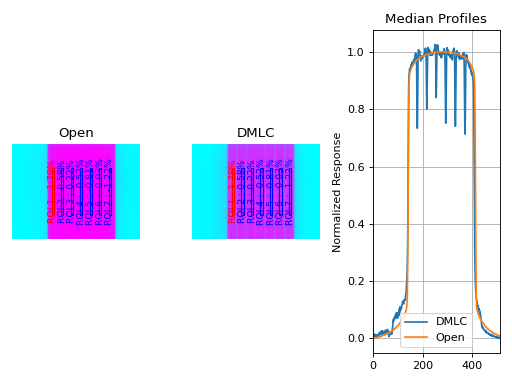
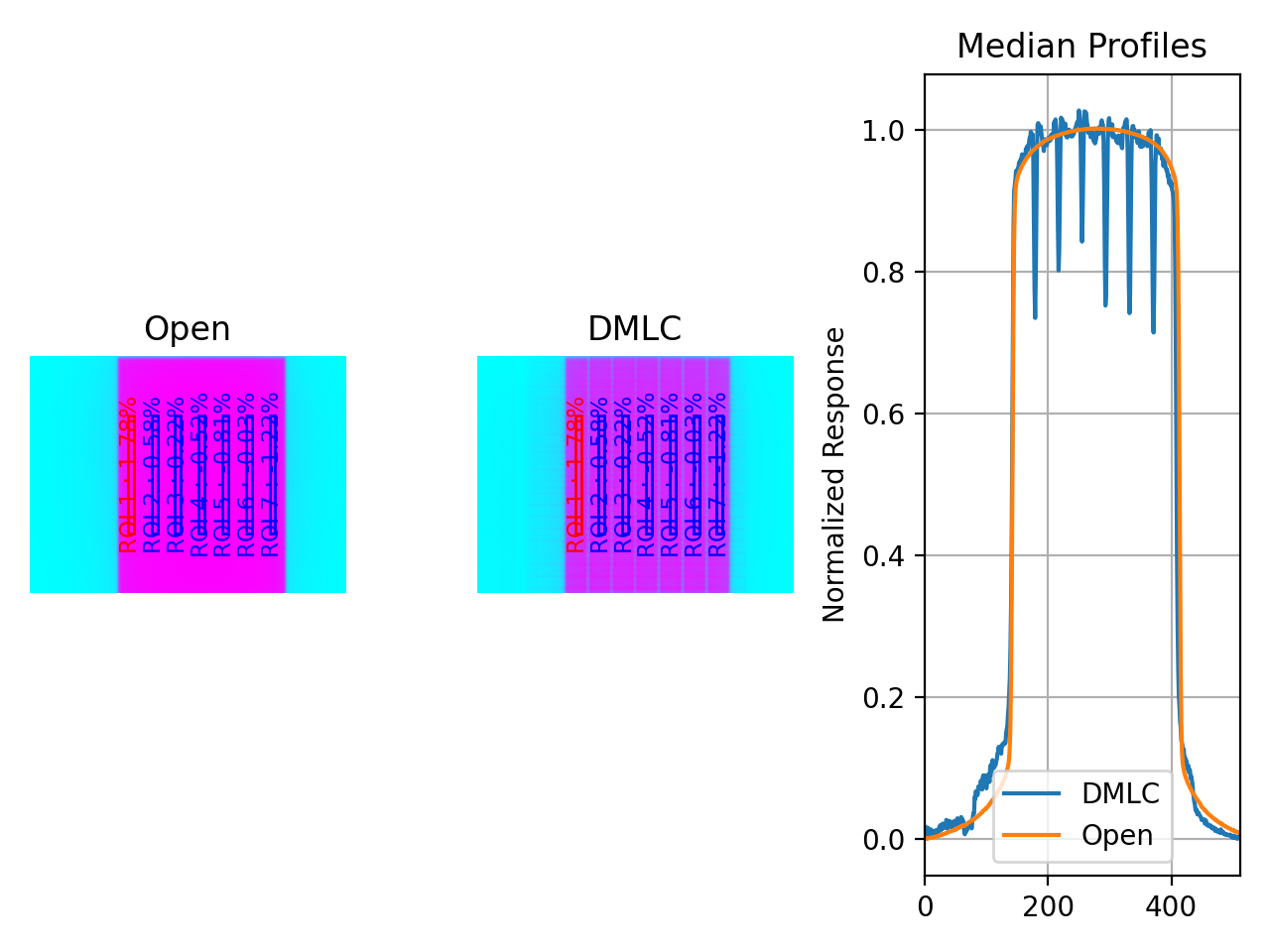
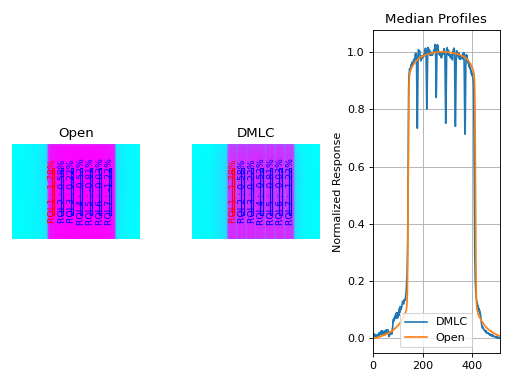
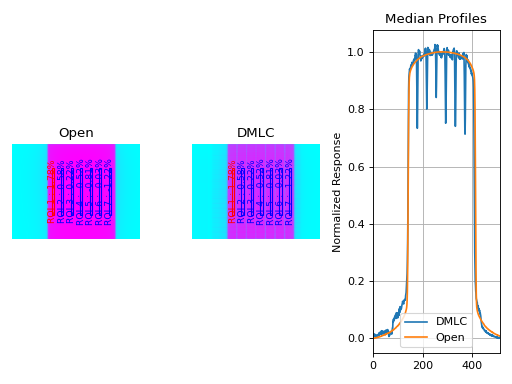
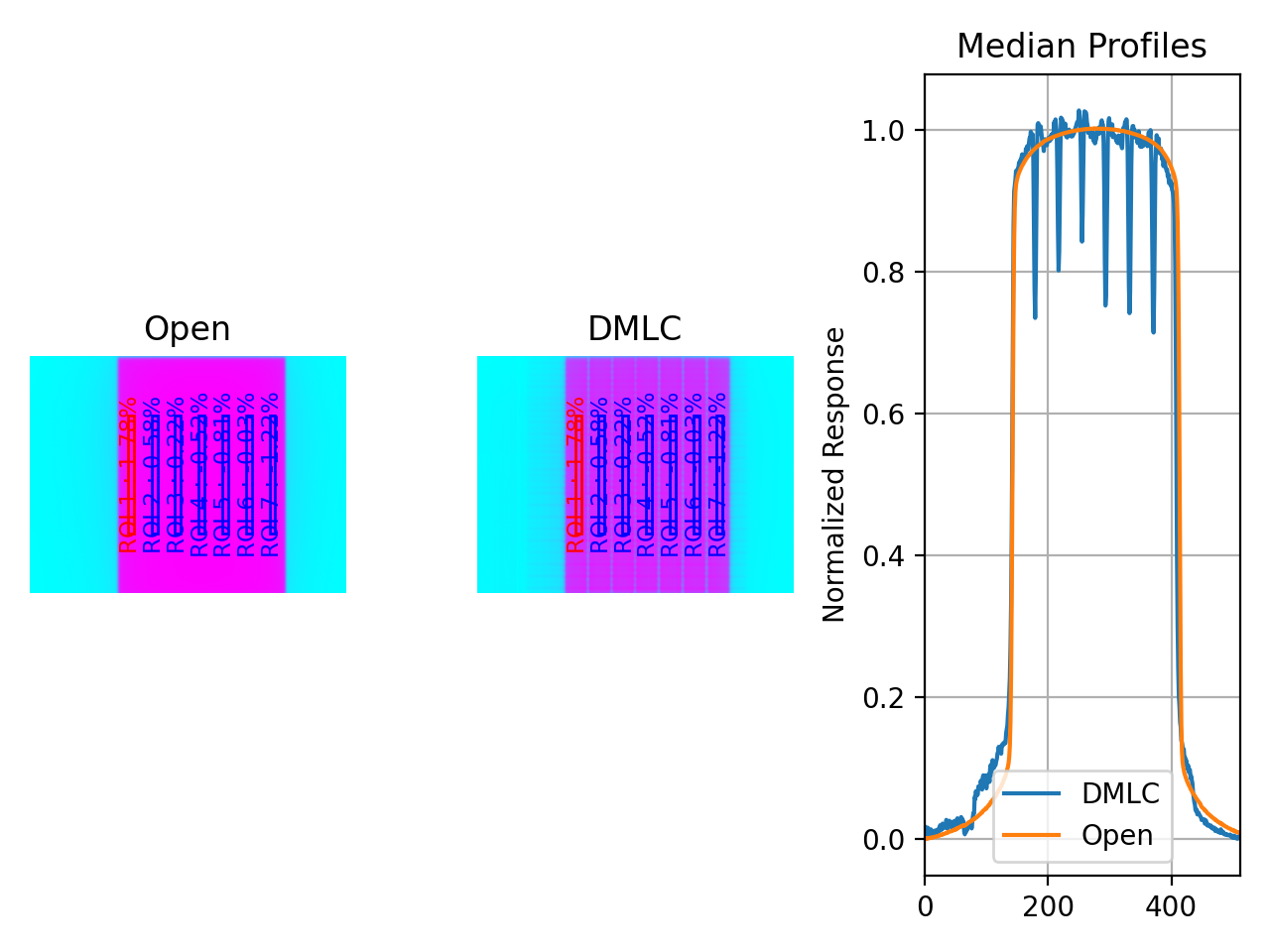
Results will be printed to the console and a figure showing both the Open field and MLC field image will pop up:
Dose Rate & Gantry Speed
Test Results (Tol. +/-1.5%): PASS
Max Deviation: 1.01%
Absolute Mean Deviation: 0.459%
Image Acquisition
If you want to perform these specific QA tests, you’ll need DICOM plan files that control the linac precisely to deliver the test fields. These can be downloaded from my.varian.com. Once logged in, search for RapidArc and you should see two items called “RapidArc QA Test Procedures and Files for TrueBeam” (same for C-series) or “RapidArc Dynamic QA Test Procedures and Files for TrueBeam”. Use the RT Plan files and follow the instructions, not including the assessment procedure, which is the point of this module. Save & move the VMAT images to a place you can use pylinac.
Prefabricated plans are available at Pre-Generated Plans for download. See also the Plan Generator module for creating your own plans.
Typical Use
The VMAT QA analysis follows what is specified in the Varian QA Test Procedures and assumes your tests will run the exact same way. Import the appropriate class:
from pylinac import DRGS, DRMLC, DRCS
The minimum needed to get going is to:
Load images – Loading the EPID DICOM images into your VMAT class object can be done by passing the file paths, passing a ZIP archive, or passing a URL:
# Load images directly
open_img = "C:/QA Folder/VMAT/open_field.dcm"
dmlc_img = "C:/QA Folder/VMAT/dmlc_field.dcm"
my_drgs = DRGS(image_paths=(open_img, dmlc_img))

# or load from zip
my_drgs = DRGS.from_zip(r"C:/path/to/zip.zip")

# or load from a URL
my_drgs = DRGS.from_url("http://myserver.org/vmat.zip")
Finally, if you don’t have any images, you can use the demo ones provided:
my_drgs = DRGS.from_demo_images()
Analyze the images – Once the images are loaded, tell the class to analyze the images. See the Algorithm section for details on how this is done. Tolerance can also be passed and has a default value of 1.5%:
my_drgs.analyze(tolerance=1.5)
View/Save the results – The VMAT module can print out the summary of results to the console as well as draw a matplotlib image to show where the segments were placed and their values:
# print results to the console
print(my_drgs.results())
# view analyzed images
my_drgs.plot_analyzed_image()
(
Source code,png,hires.png,pdf)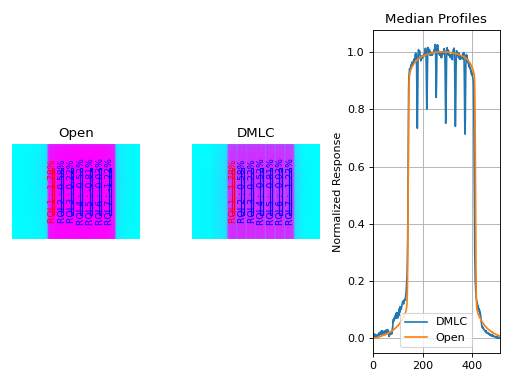
PDF reports can also be generated:
my_drgs.publish_pdf("drgs.pdf")
Customizing the analysis
You can alter both the segment size and segment positions as desired.
Customizing the segment size
To change the segment size:
drgs = DRGS.from_demo_image()
drgs.analyze(..., segment_size_mm=(10, 150))
# ROI segments will now be 10mm wide by 150mm tall
Customizing the ROI posisition on DRGS/DRMLC
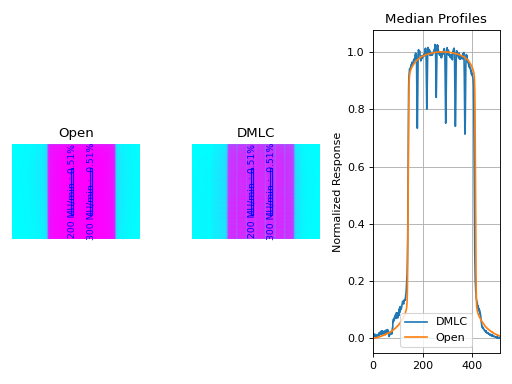
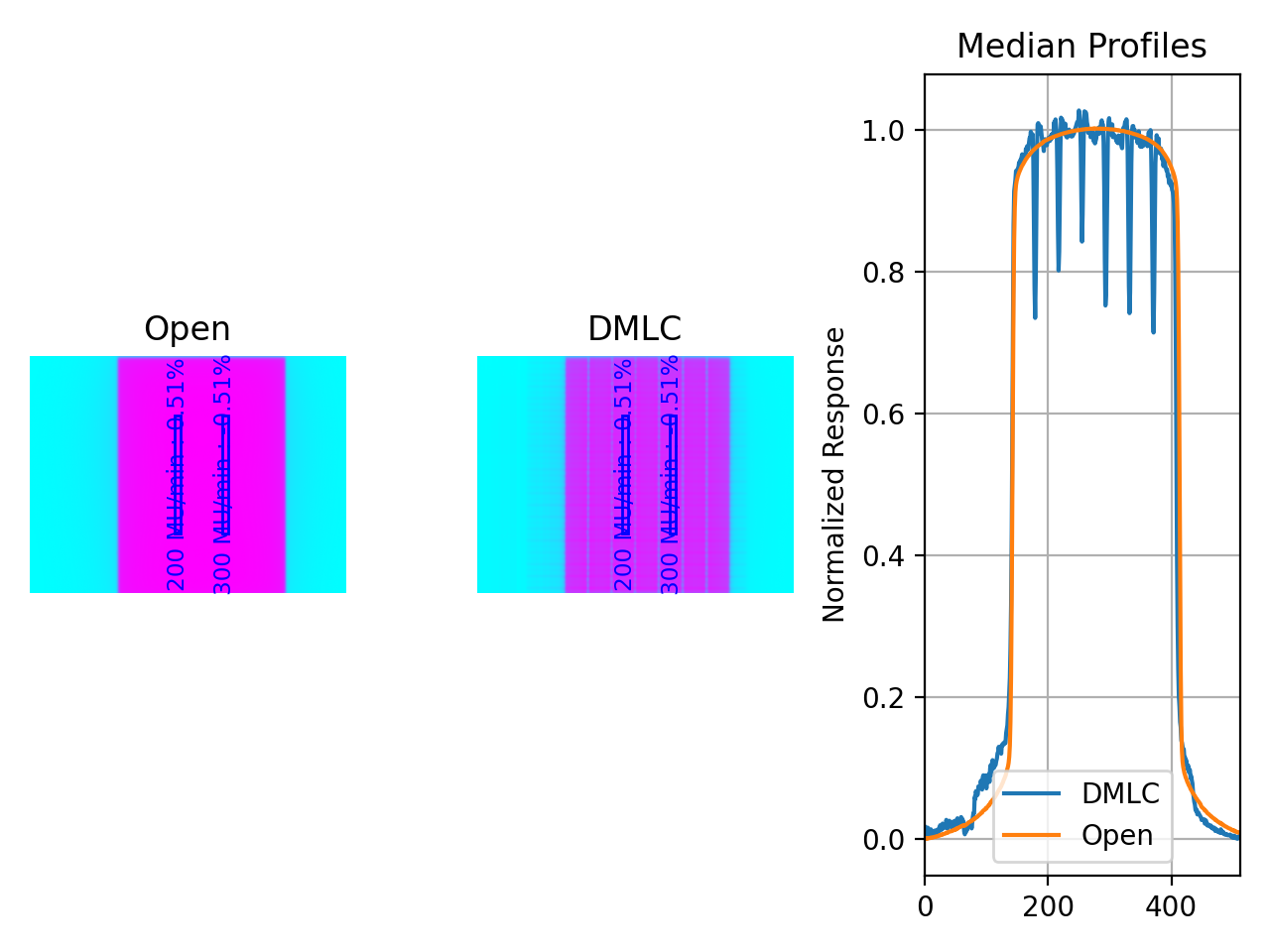
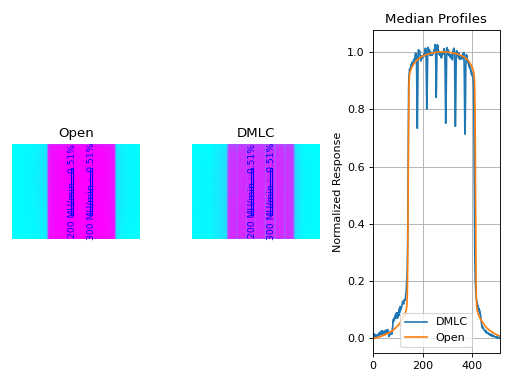
To change the x-position of the ROI segments or change the number of ROI, use a custom ROI config dictionary and pass it to the analyze method.
from pylinac import DRGS, DRMLC

# note the keys are the names of the ROIs and can be anything you like
custom_roi_config = {
    "200 MU/min": {"offset_mm": -100},
    "300 MU/min": {"offset_mm": -80},
}  # add more as needed

my_drgs = DRGS(...)  # works the same way for DRMLC
my_drgs.analyze(..., roi_config=custom_roi_config)
(Source code, png, hires.png, pdf)
Customizing the ROI posisition on DRCS
To change the position of the ROI segments or change the number of ROI, use a custom ROI config dictionary and pass it to the analyze method.
from pylinac import DRGS, DRMLC

# note the keys are the names of the ROIs and can be anything you like
custom_roi_config = {
    "15 deg/sec": {"radial_distance": 50, "angle": -120},
    "12 deg/sec": {"radial_distance": 60, "angle": -60},
}  # add more as needed

my_drcs = DRCS(...)
my_drcs.analyze(..., roi_config=custom_roi_config)
Accessing Data
Changed in version 3.0.
Using the VMAT module in your own scripts? While the analysis results can be printed out,
if you intend on using them elsewhere (e.g. in an API), they can be accessed the easiest by using the results_data() method
which returns a VMATResult instance.
Note
While the pylinac tooling may change under the hood, this object should remain largely the same and/or expand. Thus, using this is more stable than accessing attrs directly.
Continuing from above:
data = my_drgs.results_data()
data.test_type
data.passed
# and more

# return as a dict
data_dict = my_drgs.results_data(as_dict=True)
data_dict["test_type"]
...
Analysis Parameters
See pylinac.vmat.DRMLC.analyze(), pylinac.vmat.DRGS.analyze(), pylinac.vmat.DRCS.analyze() for details.
Number of ROIs: The number of ROIs to analyze. By default, the DRGS test is 7 and the DRMLC is 4.
ROI spacing: The spacing between the ROIs in mm.
Tolerance: The tolerance in % allowed deviation from the average ratioed response.
Use raw pixels: Whether to use the raw pixel values or the tag-corrected values. See Comparing to other programs and Comparison to Doselab.
ROI segment width: The width of the ROI segments in mm. By default, 5mm.
ROI segment height: The height of the ROI segments in mm. By default, 100mm.
Algorithm
The VMAT analysis algorithm is based on the “Varian RapidArc QA tests and procedures for C-Series and TrueBeam”, and “Varian RapidArc Dynamic QA Test Procedures for TrueBeam”. All three VMAT tests in this module follow the same core principle of comparing ROIs against each other, but their ROI placement strategies differ:
DRGS and DRMLC use lateral offset–based placement.
DRCS determines ROI placement based on angular position.
The algorithm works like such:
Allowances
The images can be acquired at any SID.
The images can be acquired with any EPID (aS500, aS1000, aS1200).
Restrictions
Warning
Analysis can fail or give unreliable results if any Restriction is violated.
The tests must be delivered using the DICOM RT plan files provided by Varian.
The images must be acquired with the EPID.
Pre-Analysis
Determine image scaling – Segment determination is based on offsets from the center pixel of the image. However, some physicists use 150 cm SID and others use 100 cm, and others can use a clinical setting that may be different than either of those. To account for this, the SID is determined and then scaling factors are determined to be able to perform properly-sized segment analysis.
Identify open/DMLC images – The images can be passed in any order, pylinac will automatically identify them.
Determine ratio image – The ratio image is defined as \(I_{ratio} = \frac{I_{DRGS}}{I_{open}}\)
Added in version 3.36.
Analysis
Note
Calculations tend to be lazy, computed only on demand. This represents a nominal analysis where all calculations are performed.
Calculate sample boundaries – On DRGS/DRMLC, the Segment x-positions are based on offsets from the center of the FWHM of the detected field. This allows for old and new style tests that have an x-offset from each other. These values are then scaled with the image scaling factor determined above. DRCS assumes a centered image.
Calculate segment readings – For each segment, the mean pixel value is determined for the ratio image: \(R_{corr}(x)\).
Calculate segment deviations – Segment deviation is then calculated once all the segment readings are determined. The average absolute deviation is also calculated. \(R_{deviation}(x) = \frac{R_{corr}(x)}{\bar{R_{corr}}} * 100 - 100\), where \(\bar{R_{corr}}\) is the average of all segments.
Post-Analysis
Test if segments pass tolerance – Each segment is checked to see if it was within the specified tolerance. If any samples fail, the whole test is considered failing.
Interpreting Results
This section explains what is returned in the results_data object.
This is also the same information that is given in the RadMachine results
section.
pylinac_version– The version of Pylinac that was used to perform the analysis.date_of_analysis– The date the analysis was performed.test_type– The type of test that was performed as a string.tolerance_percent– The tolerance used to determine if the test passed or failed.passed– A boolean indicating if the test passed or failed.abs_mean_deviation– The average absolute deviation of all segments.max_deviation_percent– The maximum deviation of any segment.segment_data– A list ofSegmentResultinstances. Each instance contains the following attributes:passed– A boolean indicating if the segment passed or failed.x_position_mm– The position of the segment ROI in mm from CAX (lateral offset if DRGS/DRMLC, radial distance if DRCS).”angular_position_deg– The angle of the segment ROI in degrees.r_corr– \(R_{corr}\) as defined above.r_dev– \(R_{deviation}\) as defined above.stdev– The standard deviation of the segment i.e. \(\sigma \left( R_{ratio} \right)\)center_x_y– The center of the segment in pixel coordinates.
Benchmarking the Algorithm
With the image generator module we can create test images to test the VMAT algorithm on known results. This is useful to isolate what is or isn’t working if the algorithm doesn’t work on a given image and when commissioning pylinac.
Note
The below examples are for the DRMLC test but can equally be applied to the DRGS tests as well.
Perfect Fields
In this example, we generate a perfectly flat set of images and analyze them.
import pylinac
from pylinac.core.image_generator import GaussianFilterLayer, PerfectFieldLayer, AS1200Image

# open image
open_path = 'perfect_open_drmlc.dcm'
as1200 = AS1200Image()
as1200.add_layer(PerfectFieldLayer(field_size_mm=(150, 110), cax_offset_mm=(0, 0)))
as1200.add_layer(GaussianFilterLayer(sigma_mm=2))
as1200.generate_dicom(file_out_name=open_path)

# DMLC image
dmlc_path = 'perfect_dmlc_drmlc.dcm'
as1200 = AS1200Image()
for offset in (-45, -15, 15, 45):
    as1200.add_layer(PerfectFieldLayer((150, 19.5), cax_offset_mm=(0, offset)))
as1200.add_layer(GaussianFilterLayer(sigma_mm=2))
as1200.generate_dicom(file_out_name=dmlc_path)

# analyze it
vmat = pylinac.DRMLC(image_paths=(open_path, dmlc_path))
vmat.analyze()
print(vmat.results())
vmat.plot_analyzed_image()
(Source code, png, hires.png, pdf)
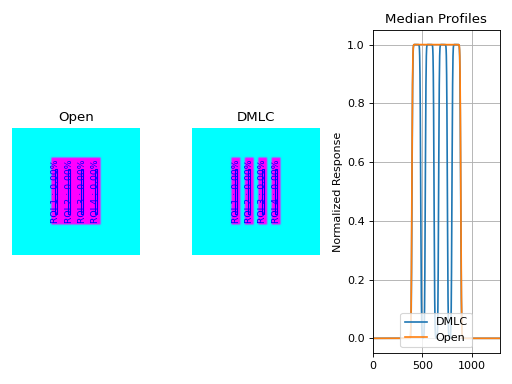
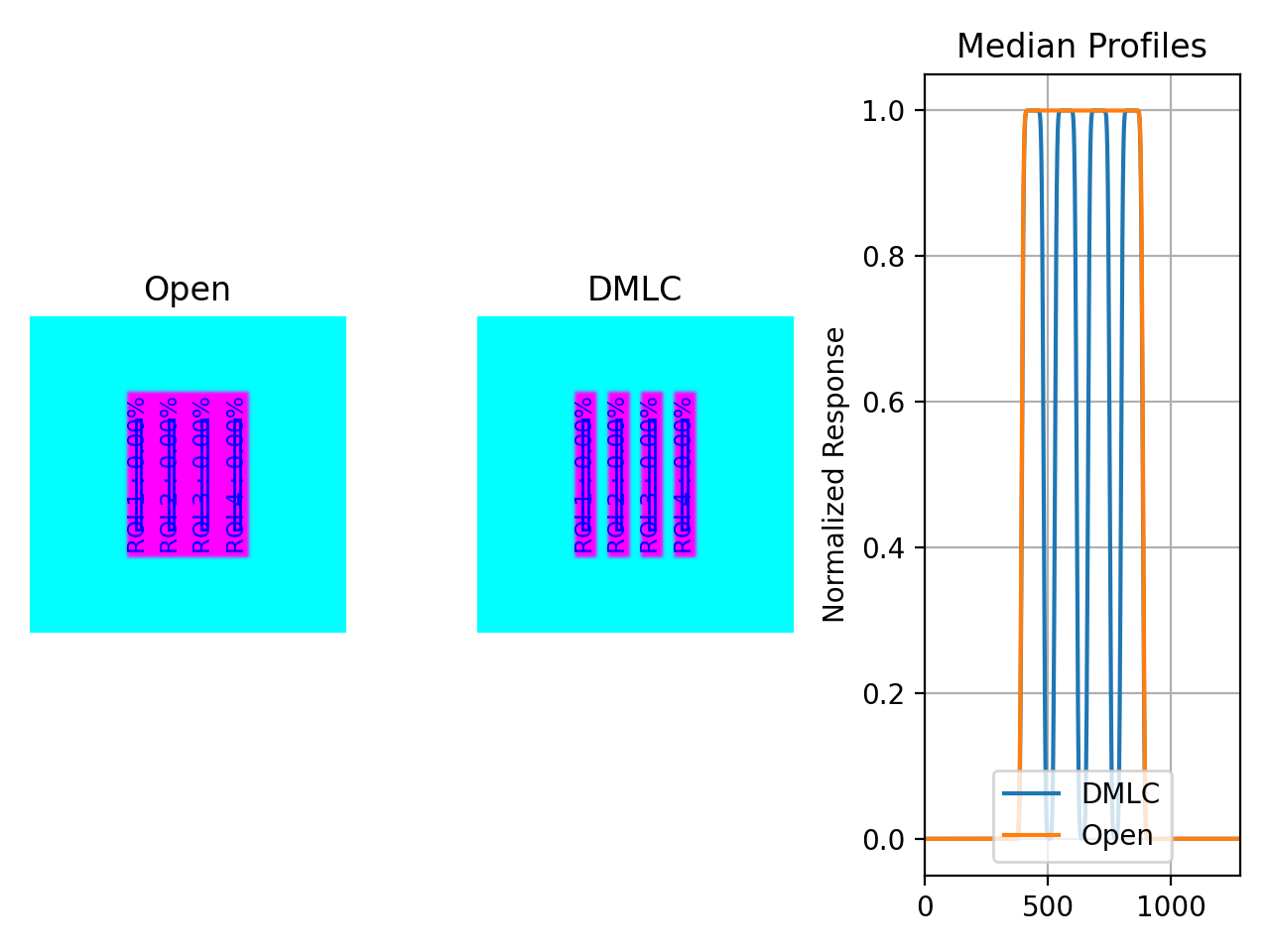
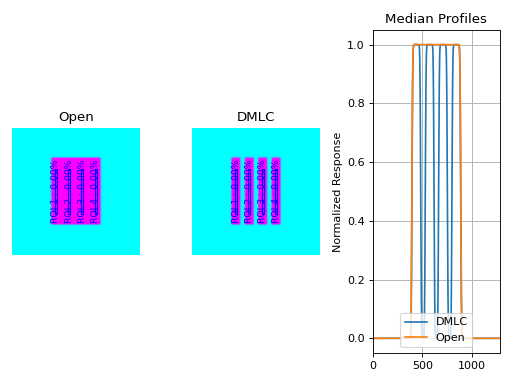
with output:
Dose Rate & MLC Speed
Test Results (Tol. +/-1.5%): PASS
Max Deviation: 0.0%
Absolute Mean Deviation: 0.0%
Noisy, Realistic
We now add a horn effect and random noise to the data:
import pylinac
from pylinac.core.image_generator import GaussianFilterLayer, FilteredFieldLayer, AS1200Image, RandomNoiseLayer

# open image
open_path = 'noisy_open_drmlc.dcm'
as1200 = AS1200Image()
as1200.add_layer(FilteredFieldLayer(field_size_mm=(150, 110), cax_offset_mm=(0, 0)))
as1200.add_layer(GaussianFilterLayer(sigma_mm=2))
as1200.add_layer(RandomNoiseLayer(sigma=0.03))
as1200.generate_dicom(file_out_name=open_path)

# DMLC image
dmlc_path = 'noisy_dmlc_drmlc.dcm'
as1200 = AS1200Image()
for offset in (-45, -15, 15, 45):
    as1200.add_layer(FilteredFieldLayer((150, 19.5), cax_offset_mm=(0, offset)))
as1200.add_layer(GaussianFilterLayer(sigma_mm=2))
as1200.add_layer(RandomNoiseLayer(sigma=0.03))
as1200.generate_dicom(file_out_name=dmlc_path)

# analyze it
vmat = pylinac.DRMLC(image_paths=(open_path, dmlc_path))
vmat.analyze()
print(vmat.results())
vmat.plot_analyzed_image()
(Source code, png, hires.png, pdf)
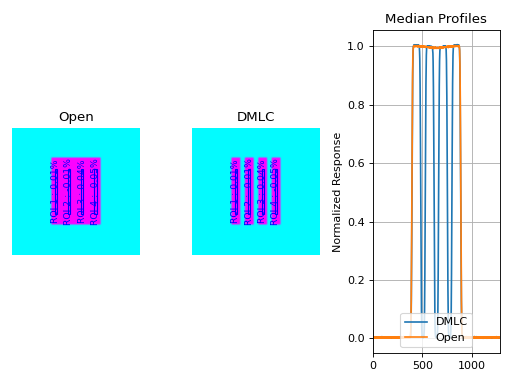
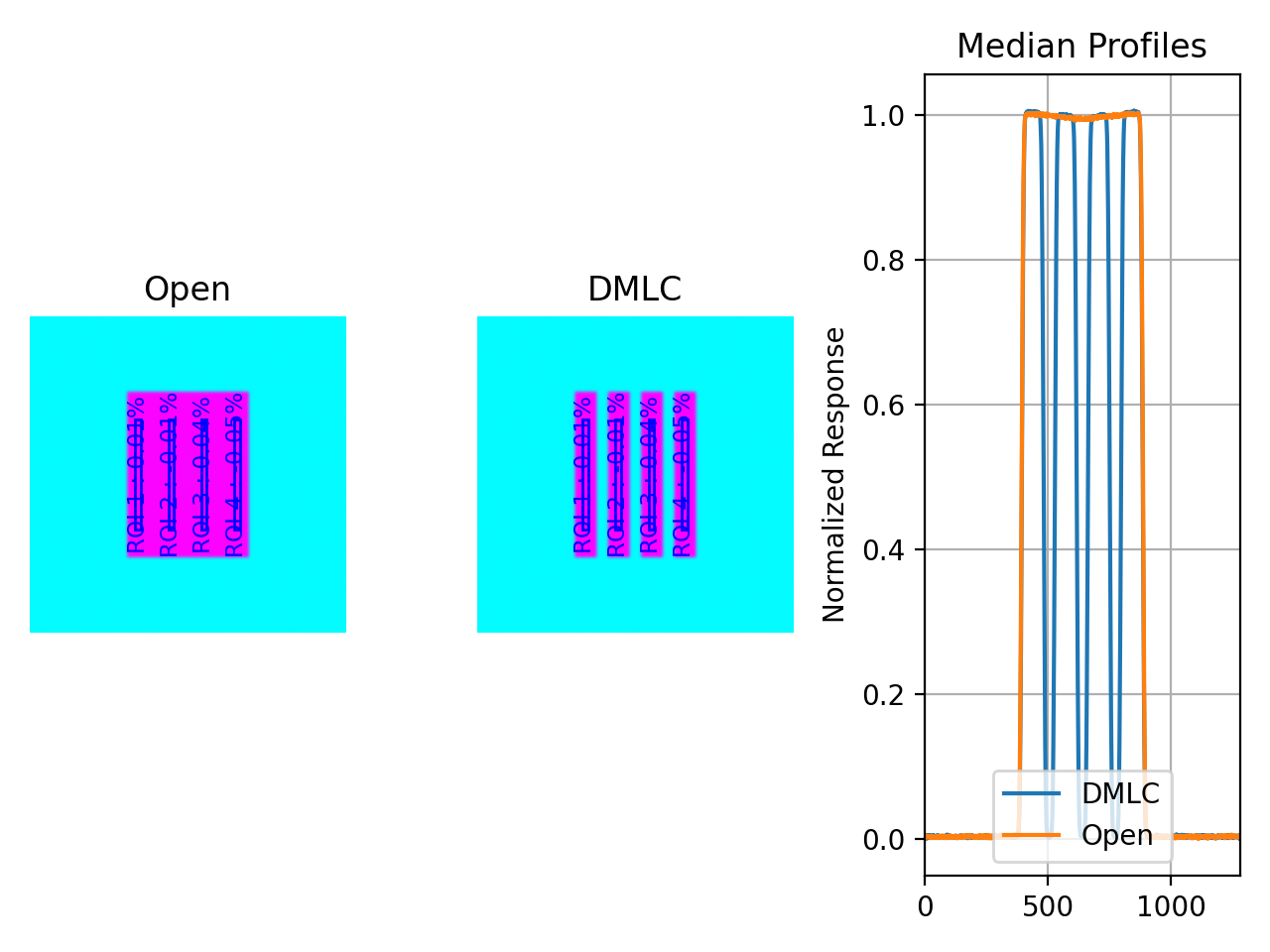
with output:
Dose Rate & MLC Speed
Test Results (Tol. +/-1.5%): PASS
Max Deviation: 0.0332%
Absolute Mean Deviation: 0.0257%
Erroneous data
Let’s now get devious and randomly adjust the height of each ROI (effectively changing the apparent MLC speed):
Note
Due to the purposely random nature shown below, this exact result is likely not reproducible, nor was it intended to be. To get reproducible behavior, use numpy with a seed value.
import random

import pylinac
from pylinac.core.image_generator import GaussianFilterLayer, FilteredFieldLayer, AS1200Image, RandomNoiseLayer

# open image
open_path = 'noisy_open_drmlc.dcm'
as1200 = AS1200Image()
as1200.add_layer(FilteredFieldLayer(field_size_mm=(150, 110), cax_offset_mm=(0, 0)))
as1200.add_layer(GaussianFilterLayer(sigma_mm=2))
as1200.add_layer(RandomNoiseLayer(sigma=0.03))
as1200.generate_dicom(file_out_name=open_path)

# DMLC image
dmlc_path = 'noisy_dmlc_drmlc.dcm'
as1200 = AS1200Image()
for offset in (-45, -15, 15, 45):
    as1200.add_layer(FilteredFieldLayer((150, 19.5), cax_offset_mm=(0, offset), alpha=random.uniform(0.93, 1)))
as1200.add_layer(GaussianFilterLayer(sigma_mm=2))
as1200.add_layer(RandomNoiseLayer(sigma=0.04))
as1200.generate_dicom(file_out_name=dmlc_path)

# analyze it
vmat = pylinac.DRMLC(image_paths=(open_path, dmlc_path))
vmat.analyze()
print(vmat.results())
vmat.plot_analyzed_image()
(Source code, png, hires.png, pdf)
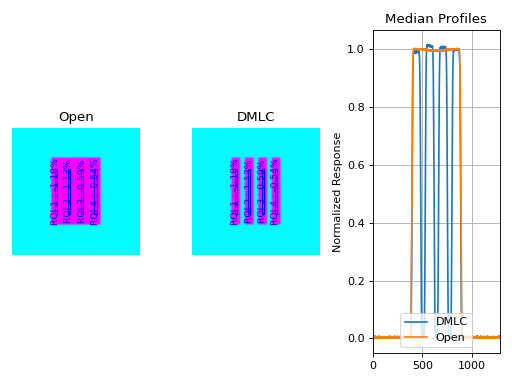
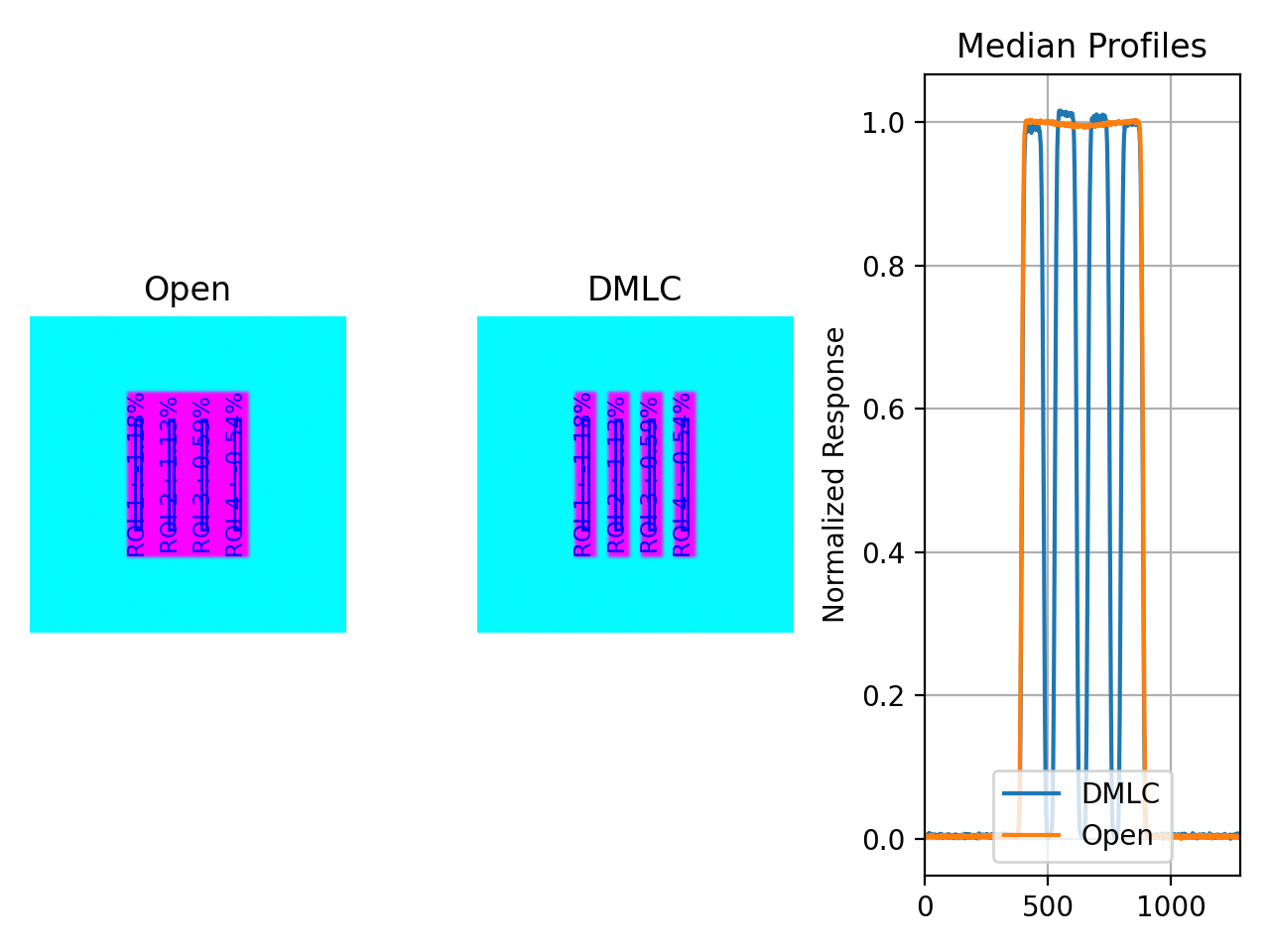
with an output of:
Dose Rate & MLC Speed
Test Results (Tol. +/-1.5%): FAIL
Max Deviation: 2.12%
Absolute Mean Deviation: 1.13%
Comparing to other programs
Note
The DRGS pattern is used as an example but the same concepts applies to both DRGS and DRMLC.
A common question is how results should be compared to other programs. While the answer will depend on several factors, we can make some general observations here.
Ensure the ROI sizes are similar - Different programs may have different defaults for the ROI size. Varian suggests a 5x100mm rectangular ROI, although this seems arbitrarily small in our opinion. In any event, to match Varian’s suggestion, the pylinac default segment ROI size is 5x100mm
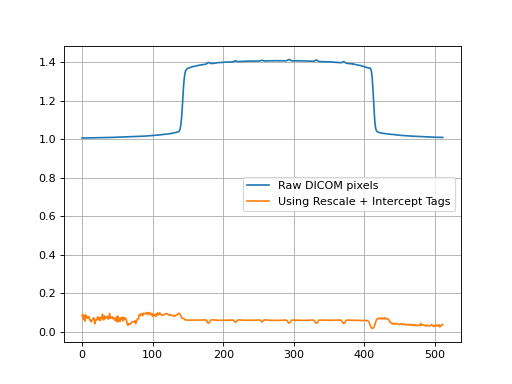
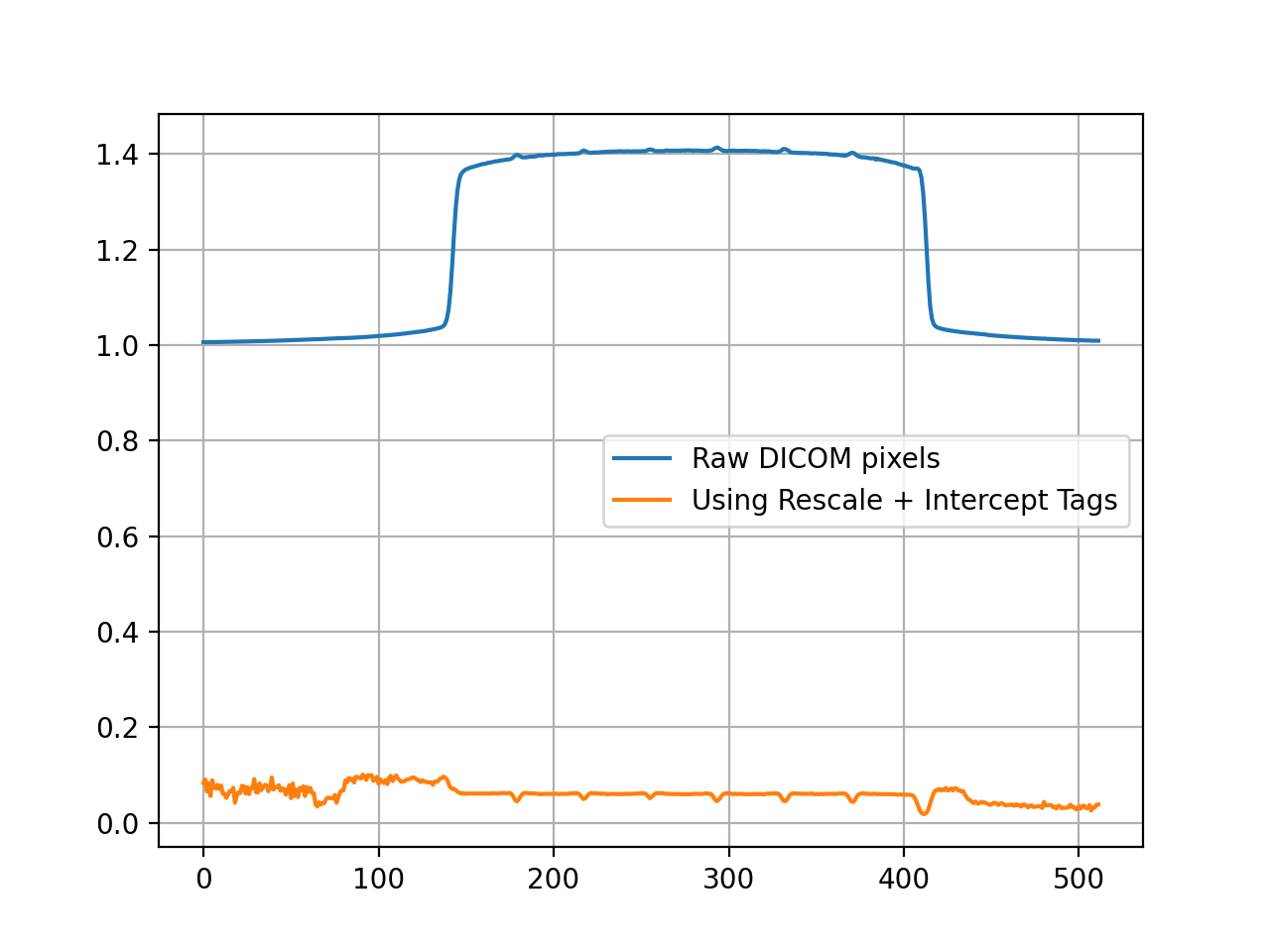
DICOM images may have different reconstruction algorithms - Pylinac’s DICOM image loading algorithm can be read here: Pixel Data Inversion. It tries to use as many tags as it can to reconstruct the correct pixel values. However, this behavior does not appear consistent across all programs. E.g. if tags are not considered when loading images, the resulting pixels (and thus ratio) may not match an image that did use tags.
Take for instance the below example comparing “raw” pixel values to using the Tag-corrected version:
from matplotlib import pyplot as plt
import pydicom

from pylinac import image
from pylinac.core.io import retrieve_demo_file, TemporaryZipDirectory

demo_zip = retrieve_demo_file('drgs.zip')
with TemporaryZipDirectory(demo_zip) as tmpzip:
    image_files = image.retrieve_image_files(tmpzip)

    # read the values "raw"
    dmlc_raw = pydicom.read_file(image_files[0])
    open_raw = pydicom.read_file(image_files[1])
    raw = dmlc_raw.pixel_array / open_raw.pixel_array

    # Tag-correct the values
    img_dmlc = image.load(image_files[0])
    img_open = image.load(image_files[1])
    corrected = img_dmlc.array / img_open.array

plt.plot(raw[200, :], label="Raw DICOM pixels")
plt.plot(corrected[200, :], label="Using Rescale + Intercept Tags")
plt.legend()
plt.grid(True)
plt.show()
(
Source code,png,hires.png,pdf)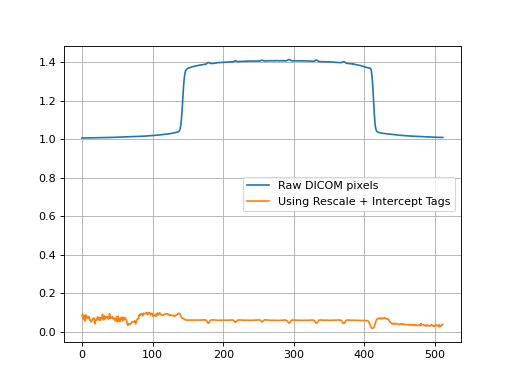
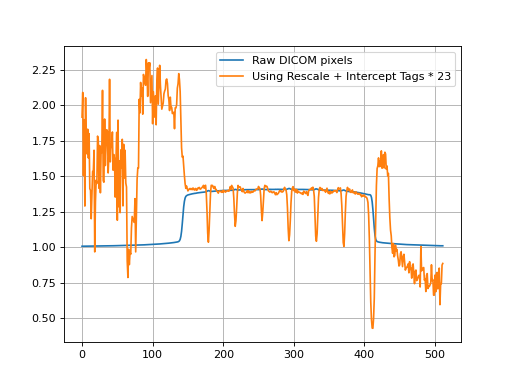
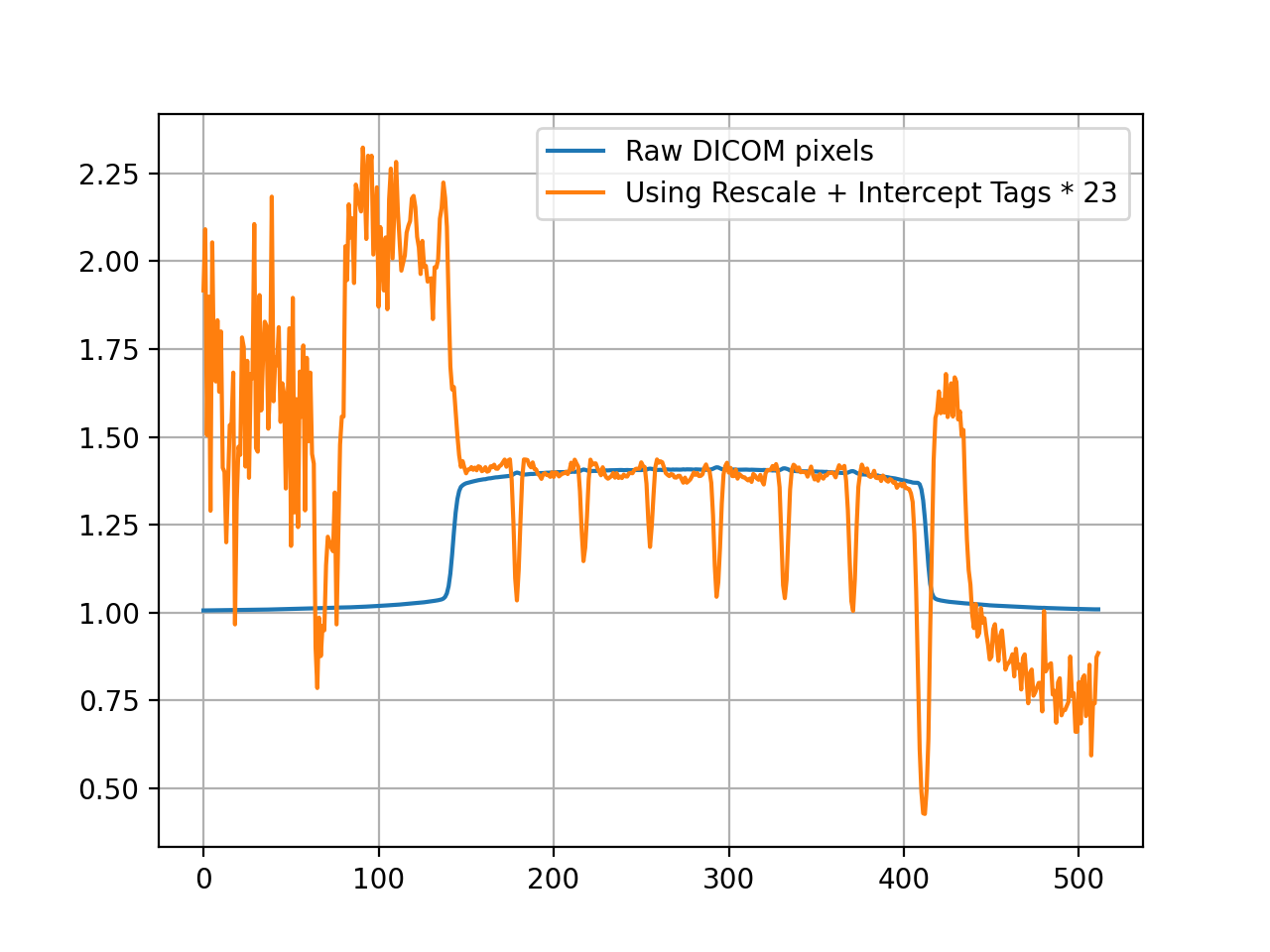
We can also scale the tag-corrected value for the purpose of comparing relative responses:
(
Source code,png,hires.png,pdf)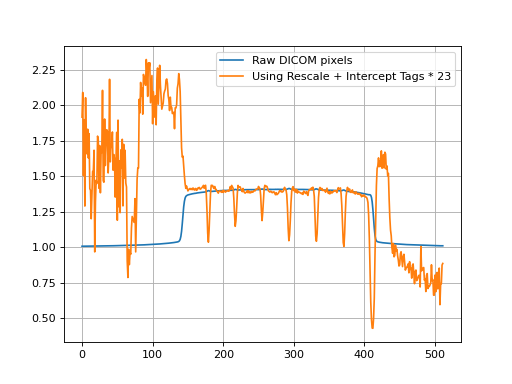
The point of the second plot is to show what the ratio of each ROI looks like between the normalizations. Inspecting the left-most ROI, we see that the raw pixel normalization is lower than the average ROI response, whereas with the tag-corrected implementation, it’s actually higher. When evaluating the ROI results of pylinac vs other programs this explains why the left-most ROI (which is used simply as an example) has a positive deviation whereas other programs may have a negative deviation.
This behavior can change depending on the tags available in the DICOM file. Newer DICOMs also have a “sign” tag to correct for inversion of pixel data. Why this difference can be problematic is that the ratio of the open to DMLC image depends on the initial pixel value.
Currently, this is a philosophical difference between programs that don’t use DICOM tags and those that do, like pylinac. If the goal is to switch from another program to pylinac, the standard approach of measuring with both algorithms to establish a baseline of differences is recommended, just as you might when switching from a water tank measurement to an array-based measurement scheme.
Comparison to Doselab
Added in version 3.13.
All that being said, if the goal is to match another program (specifically, Doselab, although this might apply to others) use the following:
from pylinac import DRMLC

drmlc = DRMLC(..., raw_pixels=True, ground=False, check_inversion=False)
...
This will skip the checking of DICOM tags for correcting the pixel values as well as other manipulations normally applied.
Here’s a table comparing the results of the DRMLC demo dataset with different variations:
Max R_dev |
ROI 1 R_dev |
ROI 2 R_dev |
ROI 3 R_dev |
ROI 4 R_dev |
|
Doselab (normalized) |
0.995 |
1.005 |
1.006 |
0.994 |
|
Doselab (as % from unity) |
0.60% |
-0.50% |
0.50% |
0.60% |
-0.60% |
Pylinac (raw=True, ground=False, inversion=False) |
0.56% |
-0.54% |
0.53% |
0.56% |
-0.55% |
Pylinac (default) |
0.89% |
-0.68% |
0.89% |
-0.10% |
-0.11% |
Pylinac (raw=False, ground=False, inversion=False) |
0.90% |
-0.68% |
0.90% |
-0.08% |
-0.12% |
The Doselab and pylinac results are very similar when the raw pixels are used. The default settings and the analysis without any extra manipulations are also extremely similar.
Note
For historical continuity, the manipulations are set to True. If you are just starting to
use Pylinac, it is recommended to use the settings of the last row. However,
it is unlikely to make a significant difference.
API Documentation
Main classes
These are the classes a typical user may interface with.
- class pylinac.vmat.DRGS(image_paths: Sequence[str | BinaryIO | Path], ground=True, check_inversion=True, **kwargs)[source]
Bases:
VMATLinearBaseClass representing a Dose-Rate, Gantry-speed VMAT test. Will accept, analyze, and return the results.
Parameters
- image_pathsiterable (list, tuple, etc)
A sequence of paths to the image files.
- kwargs
Passed to the image loading function. See
load().
- analyze(tolerance: float | int = 1.5, segment_size_mm: tuple | None = None, roi_config: dict | None = None)
Analyze the open and DMLC field VMAT images, according to 1 of 2 possible tests.
Parameters
- tolerancefloat, int, optional
The tolerance of the sample deviations in percent. Default is 1.5. Must be between 0 and 8.
- segment_size_mmtuple(int, int)
The (width, height) of the ROI segments in mm.
- roi_configdict
A dict of the ROI settings. The keys are the names of the ROIs and each value is a dict containing the offset in mm ‘offset_mm’.
- property avg_abs_r_deviation: float
Return the average of the absolute R_deviation values.
- property avg_r_deviation: float
Return the average of the R_deviation values, including the sign.
- clear_captured_warnings() None
Clear the list of captured warnings.
- classmethod from_demo_images(**kwargs)
Construct a VMAT instance using the demo images.
- classmethod from_url(url: str)
Load a ZIP archive from a URL. Must follow the naming convention.
Parameters
- urlstr
Must point to a valid URL that is a ZIP archive of two VMAT images.
- classmethod from_zip(path: str | Path, **kwargs)
Load VMAT images from a ZIP file that contains both images. Must follow the naming convention.
Parameters
- pathstr
Path to the ZIP archive which holds the VMAT image files.
- kwargs
Passed to the constructor.
- get_captured_warnings() list[dict]
Retrieve the list of captured warnings, deduplicated.
- property max_r_deviation: float
Return the value of the maximum R_deviation segment.
- plot_analyzed_image(show: bool = True, show_text: bool = True, **plt_kwargs: dict)
Plot the analyzed images. Shows the open and dmlc images with the segments drawn; also plots the median profiles of the two images for visual comparison.
Parameters
- showbool
Whether to actually show the image.
- show_textbool
Whether to show the ROI names on the image.
- plt_kwargsdict
Keyword args passed to the plt.subplots() method. Allows one to set things like figure size.
- plotly_analyzed_images(show: bool = True, show_colorbar: bool = True, show_legend: bool = True, **kwargs) dict[str, Figure]
Plot the analyzed set of images to Plotly figures.
Parameters
- showbool
Whether to show the plot.
- show_colorbarbool
Whether to show the colorbar on the plot.
- show_legendbool
Whether to show the legend on the plot.
- kwargs
Additional keyword arguments to pass to the plot.
Returns
- dict
A dictionary of the Plotly figures where the key is the name of the image and the value is the figure.
- publish_pdf(filename: str, notes: str = None, open_file: bool = False, metadata: dict | None = None, logo: Path | str | None = None)
Publish (print) a PDF containing the analysis, images, and quantitative results.
Parameters
- filename(str, file-like object}
The file to write the results to.
- notesstr, list of strings
Text; if str, prints single line. If list of strings, each list item is printed on its own line.
- open_filebool
Whether to open the file using the default program after creation.
- metadatadict
Extra data to be passed and shown in the PDF. The key and value will be shown with a colon. E.g. passing {‘Author’: ‘James’, ‘Unit’: ‘TrueBeam’} would result in text in the PDF like: ————– Author: James Unit: TrueBeam ————–
- logo: Path, str
A custom logo to use in the PDF report. If nothing is passed, the default pylinac logo is used.
- property r_devs: ndarray
Return the deviations of all segments as an array.
- results() str
A string of the summary of the analysis results.
Returns
- str
The results string showing the overall result and deviation statistics by segment.
- results_data(as_dict: bool = False, as_json: bool = False, by_alias: bool = False, exclude: set[str] | None = None) T | dict | str
Present the results data and metadata as a dataclass, dict, or tuple. The default return type is a dataclass.
Parameters
- as_dictbool
If True, return the results as a dictionary.
- as_jsonbool
If True, return the results as a JSON string. Cannot be True if as_dict is True.
- by_aliasbool
If True, use the alias names of the dataclass fields. These are generally the more human-readable names.
- excludeset
A set of fields to exclude from the results data.
- to_quaac(path: str | Path, performer: User, primary_equipment: Equipment, format: Literal['json', 'yaml'] = 'yaml', attachments: list[Attachment] | None = None, overwrite: bool = False, **kwargs) None
Write an analysis to a QuAAC file. This will include the items from results_data() and the PDF report.
Parameters
- pathstr, Path
The file to write the results to.
- performerUser
The user who performed the analysis.
- primary_equipmentEquipment
The equipment used in the analysis.
- format{‘json’, ‘yaml’}
The format to write the file in.
- attachmentslist of Attachment
Additional attachments to include in the QuAAC file.
- overwritebool
Whether to overwrite the file if it already exists.
- kwargs
Additional keyword arguments to pass to the Document instantiation.
- class pylinac.vmat.DRMLC(image_paths: Sequence[str | BinaryIO | Path], ground=True, check_inversion=True, **kwargs)[source]
Bases:
VMATLinearBaseClass representing a Dose-Rate, MLC speed VMAT test. Will accept, analyze, and return the results.
Parameters
- image_pathsiterable (list, tuple, etc)
A sequence of paths to the image files.
- kwargs
Passed to the image loading function. See
load().
- analyze(tolerance: float | int = 1.5, segment_size_mm: tuple | None = None, roi_config: dict | None = None)
Analyze the open and DMLC field VMAT images, according to 1 of 2 possible tests.
Parameters
- tolerancefloat, int, optional
The tolerance of the sample deviations in percent. Default is 1.5. Must be between 0 and 8.
- segment_size_mmtuple(int, int)
The (width, height) of the ROI segments in mm.
- roi_configdict
A dict of the ROI settings. The keys are the names of the ROIs and each value is a dict containing the offset in mm ‘offset_mm’.
- property avg_abs_r_deviation: float
Return the average of the absolute R_deviation values.
- property avg_r_deviation: float
Return the average of the R_deviation values, including the sign.
- clear_captured_warnings() None
Clear the list of captured warnings.
- classmethod from_demo_images(**kwargs)
Construct a VMAT instance using the demo images.
- classmethod from_url(url: str)
Load a ZIP archive from a URL. Must follow the naming convention.
Parameters
- urlstr
Must point to a valid URL that is a ZIP archive of two VMAT images.
- classmethod from_zip(path: str | Path, **kwargs)
Load VMAT images from a ZIP file that contains both images. Must follow the naming convention.
Parameters
- pathstr
Path to the ZIP archive which holds the VMAT image files.
- kwargs
Passed to the constructor.
- get_captured_warnings() list[dict]
Retrieve the list of captured warnings, deduplicated.
- property max_r_deviation: float
Return the value of the maximum R_deviation segment.
- plot_analyzed_image(show: bool = True, show_text: bool = True, **plt_kwargs: dict)
Plot the analyzed images. Shows the open and dmlc images with the segments drawn; also plots the median profiles of the two images for visual comparison.
Parameters
- showbool
Whether to actually show the image.
- show_textbool
Whether to show the ROI names on the image.
- plt_kwargsdict
Keyword args passed to the plt.subplots() method. Allows one to set things like figure size.
- plotly_analyzed_images(show: bool = True, show_colorbar: bool = True, show_legend: bool = True, **kwargs) dict[str, Figure]
Plot the analyzed set of images to Plotly figures.
Parameters
- showbool
Whether to show the plot.
- show_colorbarbool
Whether to show the colorbar on the plot.
- show_legendbool
Whether to show the legend on the plot.
- kwargs
Additional keyword arguments to pass to the plot.
Returns
- dict
A dictionary of the Plotly figures where the key is the name of the image and the value is the figure.
- publish_pdf(filename: str, notes: str = None, open_file: bool = False, metadata: dict | None = None, logo: Path | str | None = None)
Publish (print) a PDF containing the analysis, images, and quantitative results.
Parameters
- filename(str, file-like object}
The file to write the results to.
- notesstr, list of strings
Text; if str, prints single line. If list of strings, each list item is printed on its own line.
- open_filebool
Whether to open the file using the default program after creation.
- metadatadict
Extra data to be passed and shown in the PDF. The key and value will be shown with a colon. E.g. passing {‘Author’: ‘James’, ‘Unit’: ‘TrueBeam’} would result in text in the PDF like: ————– Author: James Unit: TrueBeam ————–
- logo: Path, str
A custom logo to use in the PDF report. If nothing is passed, the default pylinac logo is used.
- property r_devs: ndarray
Return the deviations of all segments as an array.
- results() str
A string of the summary of the analysis results.
Returns
- str
The results string showing the overall result and deviation statistics by segment.
- results_data(as_dict: bool = False, as_json: bool = False, by_alias: bool = False, exclude: set[str] | None = None) T | dict | str
Present the results data and metadata as a dataclass, dict, or tuple. The default return type is a dataclass.
Parameters
- as_dictbool
If True, return the results as a dictionary.
- as_jsonbool
If True, return the results as a JSON string. Cannot be True if as_dict is True.
- by_aliasbool
If True, use the alias names of the dataclass fields. These are generally the more human-readable names.
- excludeset
A set of fields to exclude from the results data.
- to_quaac(path: str | Path, performer: User, primary_equipment: Equipment, format: Literal['json', 'yaml'] = 'yaml', attachments: list[Attachment] | None = None, overwrite: bool = False, **kwargs) None
Write an analysis to a QuAAC file. This will include the items from results_data() and the PDF report.
Parameters
- pathstr, Path
The file to write the results to.
- performerUser
The user who performed the analysis.
- primary_equipmentEquipment
The equipment used in the analysis.
- format{‘json’, ‘yaml’}
The format to write the file in.
- attachmentslist of Attachment
Additional attachments to include in the QuAAC file.
- overwritebool
Whether to overwrite the file if it already exists.
- kwargs
Additional keyword arguments to pass to the Document instantiation.
- class pylinac.vmat.DRCS(image_paths: Sequence[str | BinaryIO | Path], ground=True, check_inversion=True, **kwargs)[source]
Bases:
VMATBaseClass representing a Dose-Rate, Collimator speed VMAT test. Will accept, analyze, and return the results.
Parameters
- image_pathsiterable (list, tuple, etc)
A sequence of paths to the image files.
- kwargs
Passed to the image loading function. See
load().
- collimator_deviations
alias of
list[float]
- analyze(tolerance: float | int = 1.5, segment_size_mm: tuple | None = None, roi_config: dict | None = None, collimator_radial_distances: tuple[float, float] | None = None, collimator_config: dict | None = None)[source]
Analyze DRCS images and compute segment and spoke deviations.
Parameters
- tolerance
Percent tolerance used for segment pass/fail determination.
- segment_size_mm
Segment width/height in mm. If
None, usesdefault_segment_size_mm.- roi_config
Mapping of ROI names to ROI geometry. If
None, usesdefault_roi_config.- collimator_radial_distances
Two radii (in mm) used to sample collimator spokes. If
None, usesdefault_collimator_radial_distances.- collimator_config
Mapping of spoke label to nominal angle in degrees. If
None, usesdefault_collimator_config.
- property avg_abs_r_deviation: float
Return the average of the absolute R_deviation values.
- property avg_r_deviation: float
Return the average of the R_deviation values, including the sign.
- clear_captured_warnings() None
Clear the list of captured warnings.
- classmethod from_demo_images(**kwargs)
Construct a VMAT instance using the demo images.
- classmethod from_url(url: str)
Load a ZIP archive from a URL. Must follow the naming convention.
Parameters
- urlstr
Must point to a valid URL that is a ZIP archive of two VMAT images.
- classmethod from_zip(path: str | Path, **kwargs)
Load VMAT images from a ZIP file that contains both images. Must follow the naming convention.
Parameters
- pathstr
Path to the ZIP archive which holds the VMAT image files.
- kwargs
Passed to the constructor.
- get_captured_warnings() list[dict]
Retrieve the list of captured warnings, deduplicated.
- property max_r_deviation: float
Return the value of the maximum R_deviation segment.
- plot_analyzed_image(show: bool = True, show_text: bool = True, **plt_kwargs: dict)
Plot the analyzed images. Shows the open and dmlc images with the segments drawn; also plots the median profiles of the two images for visual comparison.
Parameters
- showbool
Whether to actually show the image.
- show_textbool
Whether to show the ROI names on the image.
- plt_kwargsdict
Keyword args passed to the plt.subplots() method. Allows one to set things like figure size.
- publish_pdf(filename: str, notes: str = None, open_file: bool = False, metadata: dict | None = None, logo: Path | str | None = None)
Publish (print) a PDF containing the analysis, images, and quantitative results.
Parameters
- filename(str, file-like object}
The file to write the results to.
- notesstr, list of strings
Text; if str, prints single line. If list of strings, each list item is printed on its own line.
- open_filebool
Whether to open the file using the default program after creation.
- metadatadict
Extra data to be passed and shown in the PDF. The key and value will be shown with a colon. E.g. passing {‘Author’: ‘James’, ‘Unit’: ‘TrueBeam’} would result in text in the PDF like: ————– Author: James Unit: TrueBeam ————–
- logo: Path, str
A custom logo to use in the PDF report. If nothing is passed, the default pylinac logo is used.
- property r_devs: ndarray
Return the deviations of all segments as an array.
- results() str
A string of the summary of the analysis results.
Returns
- str
The results string showing the overall result and deviation statistics by segment.
- results_data(as_dict: bool = False, as_json: bool = False, by_alias: bool = False, exclude: set[str] | None = None) T | dict | str
Present the results data and metadata as a dataclass, dict, or tuple. The default return type is a dataclass.
Parameters
- as_dictbool
If True, return the results as a dictionary.
- as_jsonbool
If True, return the results as a JSON string. Cannot be True if as_dict is True.
- by_aliasbool
If True, use the alias names of the dataclass fields. These are generally the more human-readable names.
- excludeset
A set of fields to exclude from the results data.
- to_quaac(path: str | Path, performer: User, primary_equipment: Equipment, format: Literal['json', 'yaml'] = 'yaml', attachments: list[Attachment] | None = None, overwrite: bool = False, **kwargs) None
Write an analysis to a QuAAC file. This will include the items from results_data() and the PDF report.
Parameters
- pathstr, Path
The file to write the results to.
- performerUser
The user who performed the analysis.
- primary_equipmentEquipment
The equipment used in the analysis.
- format{‘json’, ‘yaml’}
The format to write the file in.
- attachmentslist of Attachment
Additional attachments to include in the QuAAC file.
- overwritebool
Whether to overwrite the file if it already exists.
- kwargs
Additional keyword arguments to pass to the Document instantiation.
- plotly_analyzed_images(show: bool = True, show_colorbar: bool = True, show_legend: bool = True, **kwargs) dict[str, Figure][source]
Plot DRCS analyzed images and append DRCS collimator line overlays.
This method first calls the VMAT base implementation to build the standard Open, DMLC, and profile Plotly figures (including ROI segment annotations). It then adds DRCS-specific collimator line overlays to the DMLC figure only, using the endpoints stored in
self.collimator_deviations.Restricting the overlays to the DMLC panel mirrors the DRCS measurement workflow and avoids implying that the lines are derived from the Open image. This behavior also matches the matplotlib DRCS override so users see consistent visual diagnostics across plotting backends.
Parameters
- showbool
Whether to display the resulting Plotly figures immediately.
- show_colorbarbool
Whether the base image traces should display a colorbar.
- show_legendbool
Whether legends should be shown for base traces.
- kwargsdict
Additional keyword arguments forwarded to the base plotting call. These values are passed through to
plotly_analyzed_images().
Returns
- dict[str, plotly.graph_objects.Figure]
A mapping of figure names (
"Open","DMLC", and"Profile") to Plotly figures containing DRCS analysis annotations.
- pydantic model pylinac.vmat.VMATResult[source]
Bases:
ResultBaseThis class should not be called directly. It is returned by the
results_data()method. It is a dataclass under the hood and thus comes with all the dunder magic.Use the following attributes as normal class attributes.
Create a new model by parsing and validating input data from keyword arguments.
Raises [ValidationError][pydantic_core.ValidationError] if the input data cannot be validated to form a valid model.
self is explicitly positional-only to allow self as a field name.
- field test_type: str [Required]
The type of test that was performed as a string.
- field tolerance_percent: float [Required]
The tolerance used to determine if the test passed or failed.
- field max_deviation_percent: float [Required]
The maximum deviation of any segment.
- field abs_mean_deviation: float [Required]
The average absolute deviation of all segments.
- field passed: bool [Required]
A boolean indicating if the test passed or failed.
- field segment_data: list[SegmentResult] [Required]
List of individual segment data.
- field named_segment_data: dict[str, SegmentResult] [Required]
Named individual segment data.
- pydantic model pylinac.vmat.SegmentResult[source]
Bases:
BaseModelAn individual segment/ROI result
Create a new model by parsing and validating input data from keyword arguments.
Raises [ValidationError][pydantic_core.ValidationError] if the input data cannot be validated to form a valid model.
self is explicitly positional-only to allow self as a field name.
- field passed: bool [Required]
A boolean indicating if the segment passed or failed.
- field x_position_mm: float [Required]
The position of the segment ROI in mm from CAX (lateral offset if DRGS/DRMLC, radial distance if DRCS).
- field angular_position_deg: float [Required]
The angle of the segment ROI in degrees.
- field r_corr: float [Required]
R corrected (ratio)
- field r_dev: float [Required]
R deviation (%)
- field center_x_y: PointSerialized [Required]
The center of the segment in pixel coordinates.
- field stdev: float [Required]
The standard deviation of the segment of the ratioed images (DMLC / Open)
Supporting Classes
You generally won’t have to interface with these unless you’re doing advanced behavior.
- class pylinac.vmat.VMATBase(image_paths: Sequence[str | BinaryIO | Path], ground=True, check_inversion=True, **kwargs)[source]
Bases:
ABC,ResultsDataMixin[VMATResult],QuaacMixinParameters
- image_pathsiterable (list, tuple, etc)
A sequence of paths to the image files.
- kwargs
Passed to the image loading function. See
load().
- classmethod from_url(url: str)[source]
Load a ZIP archive from a URL. Must follow the naming convention.
Parameters
- urlstr
Must point to a valid URL that is a ZIP archive of two VMAT images.
- classmethod from_zip(path: str | Path, **kwargs)[source]
Load VMAT images from a ZIP file that contains both images. Must follow the naming convention.
Parameters
- pathstr
Path to the ZIP archive which holds the VMAT image files.
- kwargs
Passed to the constructor.
- analyze(tolerance: float | int = 1.5, segment_size_mm: tuple | None = None, roi_config: dict | None = None)[source]
Analyze the open and DMLC field VMAT images, according to 1 of 2 possible tests.
Parameters
- tolerancefloat, int, optional
The tolerance of the sample deviations in percent. Default is 1.5. Must be between 0 and 8.
- segment_size_mmtuple(int, int)
The (width, height) of the ROI segments in mm.
- roi_configdict
A dict of the ROI settings. The keys are the names of the ROIs and each value is a dict containing the offset in mm ‘offset_mm’.
- results() str[source]
A string of the summary of the analysis results.
Returns
- str
The results string showing the overall result and deviation statistics by segment.
- property r_devs: ndarray
Return the deviations of all segments as an array.
- property avg_abs_r_deviation: float
Return the average of the absolute R_deviation values.
- property avg_r_deviation: float
Return the average of the R_deviation values, including the sign.
- property max_r_deviation: float
Return the value of the maximum R_deviation segment.
- plotly_analyzed_images(show: bool = True, show_colorbar: bool = True, show_legend: bool = True, **kwargs) dict[str, Figure][source]
Plot the analyzed set of images to Plotly figures.
Parameters
- showbool
Whether to show the plot.
- show_colorbarbool
Whether to show the colorbar on the plot.
- show_legendbool
Whether to show the legend on the plot.
- kwargs
Additional keyword arguments to pass to the plot.
Returns
- dict
A dictionary of the Plotly figures where the key is the name of the image and the value is the figure.
- plot_analyzed_image(show: bool = True, show_text: bool = True, **plt_kwargs: dict)[source]
Plot the analyzed images. Shows the open and dmlc images with the segments drawn; also plots the median profiles of the two images for visual comparison.
Parameters
- showbool
Whether to actually show the image.
- show_textbool
Whether to show the ROI names on the image.
- plt_kwargsdict
Keyword args passed to the plt.subplots() method. Allows one to set things like figure size.
- publish_pdf(filename: str, notes: str = None, open_file: bool = False, metadata: dict | None = None, logo: Path | str | None = None)[source]
Publish (print) a PDF containing the analysis, images, and quantitative results.
Parameters
- filename(str, file-like object}
The file to write the results to.
- notesstr, list of strings
Text; if str, prints single line. If list of strings, each list item is printed on its own line.
- open_filebool
Whether to open the file using the default program after creation.
- metadatadict
Extra data to be passed and shown in the PDF. The key and value will be shown with a colon. E.g. passing {‘Author’: ‘James’, ‘Unit’: ‘TrueBeam’} would result in text in the PDF like: ————– Author: James Unit: TrueBeam ————–
- logo: Path, str
A custom logo to use in the PDF report. If nothing is passed, the default pylinac logo is used.
- clear_captured_warnings() None
Clear the list of captured warnings.
- get_captured_warnings() list[dict]
Retrieve the list of captured warnings, deduplicated.
- results_data(as_dict: bool = False, as_json: bool = False, by_alias: bool = False, exclude: set[str] | None = None) T | dict | str
Present the results data and metadata as a dataclass, dict, or tuple. The default return type is a dataclass.
Parameters
- as_dictbool
If True, return the results as a dictionary.
- as_jsonbool
If True, return the results as a JSON string. Cannot be True if as_dict is True.
- by_aliasbool
If True, use the alias names of the dataclass fields. These are generally the more human-readable names.
- excludeset
A set of fields to exclude from the results data.
- to_quaac(path: str | Path, performer: User, primary_equipment: Equipment, format: Literal['json', 'yaml'] = 'yaml', attachments: list[Attachment] | None = None, overwrite: bool = False, **kwargs) None
Write an analysis to a QuAAC file. This will include the items from results_data() and the PDF report.
Parameters
- pathstr, Path
The file to write the results to.
- performerUser
The user who performed the analysis.
- primary_equipmentEquipment
The equipment used in the analysis.
- format{‘json’, ‘yaml’}
The format to write the file in.
- attachmentslist of Attachment
Additional attachments to include in the QuAAC file.
- overwritebool
Whether to overwrite the file if it already exists.
- kwargs
Additional keyword arguments to pass to the Document instantiation.
- class pylinac.vmat.VMATLinearBase(image_paths: Sequence[str | BinaryIO | Path], ground=True, check_inversion=True, **kwargs)[source]
Bases:
VMATBase,ABCClass representing linear VMAT tests: - DRGS: Dose-Rate vs Gantry-speed - DRMLC: Dose-Rate vs MLC-speed Will accept, analyze, and return the results.
Parameters
- image_pathsiterable (list, tuple, etc)
A sequence of paths to the image files.
- kwargs
Passed to the image loading function. See
load().
- analyze(tolerance: float | int = 1.5, segment_size_mm: tuple | None = None, roi_config: dict | None = None)
Analyze the open and DMLC field VMAT images, according to 1 of 2 possible tests.
Parameters
- tolerancefloat, int, optional
The tolerance of the sample deviations in percent. Default is 1.5. Must be between 0 and 8.
- segment_size_mmtuple(int, int)
The (width, height) of the ROI segments in mm.
- roi_configdict
A dict of the ROI settings. The keys are the names of the ROIs and each value is a dict containing the offset in mm ‘offset_mm’.
- property avg_abs_r_deviation: float
Return the average of the absolute R_deviation values.
- property avg_r_deviation: float
Return the average of the R_deviation values, including the sign.
- clear_captured_warnings() None
Clear the list of captured warnings.
- classmethod from_demo_images(**kwargs)
Construct a VMAT instance using the demo images.
- classmethod from_url(url: str)
Load a ZIP archive from a URL. Must follow the naming convention.
Parameters
- urlstr
Must point to a valid URL that is a ZIP archive of two VMAT images.
- classmethod from_zip(path: str | Path, **kwargs)
Load VMAT images from a ZIP file that contains both images. Must follow the naming convention.
Parameters
- pathstr
Path to the ZIP archive which holds the VMAT image files.
- kwargs
Passed to the constructor.
- get_captured_warnings() list[dict]
Retrieve the list of captured warnings, deduplicated.
- property max_r_deviation: float
Return the value of the maximum R_deviation segment.
- plot_analyzed_image(show: bool = True, show_text: bool = True, **plt_kwargs: dict)
Plot the analyzed images. Shows the open and dmlc images with the segments drawn; also plots the median profiles of the two images for visual comparison.
Parameters
- showbool
Whether to actually show the image.
- show_textbool
Whether to show the ROI names on the image.
- plt_kwargsdict
Keyword args passed to the plt.subplots() method. Allows one to set things like figure size.
- plotly_analyzed_images(show: bool = True, show_colorbar: bool = True, show_legend: bool = True, **kwargs) dict[str, Figure]
Plot the analyzed set of images to Plotly figures.
Parameters
- showbool
Whether to show the plot.
- show_colorbarbool
Whether to show the colorbar on the plot.
- show_legendbool
Whether to show the legend on the plot.
- kwargs
Additional keyword arguments to pass to the plot.
Returns
- dict
A dictionary of the Plotly figures where the key is the name of the image and the value is the figure.
- publish_pdf(filename: str, notes: str = None, open_file: bool = False, metadata: dict | None = None, logo: Path | str | None = None)
Publish (print) a PDF containing the analysis, images, and quantitative results.
Parameters
- filename(str, file-like object}
The file to write the results to.
- notesstr, list of strings
Text; if str, prints single line. If list of strings, each list item is printed on its own line.
- open_filebool
Whether to open the file using the default program after creation.
- metadatadict
Extra data to be passed and shown in the PDF. The key and value will be shown with a colon. E.g. passing {‘Author’: ‘James’, ‘Unit’: ‘TrueBeam’} would result in text in the PDF like: ————– Author: James Unit: TrueBeam ————–
- logo: Path, str
A custom logo to use in the PDF report. If nothing is passed, the default pylinac logo is used.
- property r_devs: ndarray
Return the deviations of all segments as an array.
- results() str
A string of the summary of the analysis results.
Returns
- str
The results string showing the overall result and deviation statistics by segment.
- results_data(as_dict: bool = False, as_json: bool = False, by_alias: bool = False, exclude: set[str] | None = None) T | dict | str
Present the results data and metadata as a dataclass, dict, or tuple. The default return type is a dataclass.
Parameters
- as_dictbool
If True, return the results as a dictionary.
- as_jsonbool
If True, return the results as a JSON string. Cannot be True if as_dict is True.
- by_aliasbool
If True, use the alias names of the dataclass fields. These are generally the more human-readable names.
- excludeset
A set of fields to exclude from the results data.
- to_quaac(path: str | Path, performer: User, primary_equipment: Equipment, format: Literal['json', 'yaml'] = 'yaml', attachments: list[Attachment] | None = None, overwrite: bool = False, **kwargs) None
Write an analysis to a QuAAC file. This will include the items from results_data() and the PDF report.
Parameters
- pathstr, Path
The file to write the results to.
- performerUser
The user who performed the analysis.
- primary_equipmentEquipment
The equipment used in the analysis.
- format{‘json’, ‘yaml’}
The format to write the file in.
- attachmentslist of Attachment
Additional attachments to include in the QuAAC file.
- overwritebool
Whether to overwrite the file if it already exists.
- kwargs
Additional keyword arguments to pass to the Document instantiation.
- class pylinac.vmat.Segment(center_point: Point, width: float, height: float, ratio_image: ndarray, tolerance: float | int, rotation: float = 0)[source]
Bases:
RectangleROIA class for holding and analyzing segment data of VMAT tests.
For VMAT tests, there are either 4 or 7 ‘segments’, which represents a section of the image that received radiation under the same conditions.
Attributes
- r_devfloat
The reading deviation (R_dev) from the average readings of all the segments. See documentation for equation info.
Parameters
- arrayndarray
The 2D array representing the image the disk is on.
- widthfloat
The width of the ROI in pixels.
- heightfloat
The height of the ROI in pixels.
- centerPoint
The location of the ROI center.
- rotationfloat
The rotation of the ROI itself in degrees. Defaults to 0.0.
Warning
This is separate from the angle parameter, which is the angle of the ROI from the phantom center.
- property r_corr: float
Return the ratio of the mean pixel values of DMLC/OPEN images.
- property stdev: float
Return the standard deviation of the segment.
- property passed: bool
Return whether the segment passed or failed.
- get_bg_color() str[source]
Get the background color of the segment when plotted, based on the pass/fail status.
- property area: float
The area of the rectangle.
- classmethod from_phantom_center(array: ndarray, width: float, height: float, angle: float, dist_from_center: float, phantom_center: Point, rotation: float = 0.0)
Parameters
- arrayndarray
The 2D array representing the image the disk is on.
- widthfloat
The width of the ROI in pixels.
- heightfloat
The height of the ROI in pixels.
- anglefloat
The angle of the ROI in degrees from the phantom center.
- dist_from_centerfloat
The distance of the ROI from the phantom center.
- phantom_centertuple
The location of the phantom center.
- rotationfloat
The rotation of the ROI itself in degrees. Defaults to 0.0.
Warning
This is separate from the angle parameter, which is the angle of the ROI from the phantom center.
Notes
Parameter names are different from the regular class constructor due to historical reasons and semi-backwards compatibility.
- property masked_array: ndarray
A 2D array the same shape as the underlying image array, with the pixels within the ROI set to their pixel values, and the rest set to NaN.
This can be useful for plotting. We can also calculate non-spatial statistics on this array, but requires using special functions like np.nanmean() or np.nanstd().
It’s better to calculate statistics on the pixels_flat property, which is always available.
- property max: float
The max value within the ROI.
- property mean: float
The mean value within the ROI.
- property min: float
The min value within the ROI.
- property pixel_array: ndarray
A 2D array of the pixel values within the ROI. Only available for non-rotated ROIs.
Raises
- ValueError
If the rotation is != 0, the array cannot be reshaped into a 2D array.
- property pixel_value: float
The pixel array within the ROI.
- property pixels_flat: ndarray
A flattened array of the pixel values within the ROI.
This is always available, even for rotated ROIs. However, it is flattened, so spatial statistics cannot be calculated.
- plot2axes(axes: Axes, edgecolor: str = 'black', fill: bool = False, alpha: float = 1, facecolor: str = 'g', label=None, text: str = '', fontsize: str = 'medium', text_rotation: float = 0, ha='center', va='center', **kwargs)
Plot the Rectangle to the axes.
Parameters
- axesmatplotlib.axes.Axes
An MPL axes to plot to.
- edgecolorstr
The color of the circle.
- fillbool
Whether to fill the rectangle with color or leave hollow.
- text: str
If provided, plots the given text at the center. Useful for identifying ROIs on a plotted image apart.
- fontsize: str
The size of the text, if provided. See https://matplotlib.org/stable/api/_as_gen/matplotlib.pyplot.text.html for options.
- text_rotation: float
The rotation of the text in degrees.
- ha: str
Horizontal alignment of the text. See https://matplotlib.org/stable/api/text_api.html#matplotlib.text.Text
- va: str
Vertical alignment of the text. See https://matplotlib.org/stable/api/text_api.html#matplotlib.text.Text
- plotly(fig: Figure, fill: bool = False, **kwargs) None
Draw the rectangle on a plotly figure.
- plotly_debug()
Plot the ROI against the image array along with highlighting of the pixels within the ROI.
Useful for debugging and visualizing the ROI.
- property std: float
The std within the ROI.